
In an age where our digital footprints are constantly tracked, monetized, and scrutinized, the concept of true privacy can feel like a relic of the past. From the devices in our pockets to the services we use daily, an ever-expanding web of surveillance—both corporate and governmental—observes our online lives. For those who demand an uncompromised sanctuary for their digital activities, Tails OS offers a robust solution.
This guide will walk you through setting up a persistent Tails OS USB, transforming it from a mere privacy tool into your personal, portable fortress against intrusion.
What is Tails OS? The Amnesic Incognito Live System
Tails, an acronym for “The Amnesic Incognito Live System,” is a security-focused Debian-based Linux distribution designed to preserve your privacy and anonymity. It’s not just an operating system; it’s a meticulously engineered ecosystem built around the core principles of maximum privacy.
Here’s why Tails stands out:
- Always Through Tor: All internet traffic from Tails is forced through the Tor network (The Onion Router). This multi-layered encryption and relay system makes it incredibly difficult to trace your online activities back to your physical location.
- Amnesic by Design: When you shut down Tails, it leaves no trace on the computer it was run on. It wipes itself clean, forgetting all browsing history, documents, and downloaded files—unless you explicitly save them to its persistent storage.
- Encrypted Everything: Tails includes a suite of privacy-enhancing tools out-of-the-box, such as the Tor Browser, encrypted email clients (Thunderbird with OpenPGP), instant messaging (Pidgin with OTR), and an office suite.
- Bootable from USB: Tails is designed to run from a USB stick, external hard drive, or DVD, allowing you to use it on almost any computer without affecting the host operating system.
Why Privacy Matters: Beyond “Nothing to Hide”
The common retort, “I have nothing to hide,” fundamentally misunderstands the essence of privacy. Privacy is not about concealing wrongdoing; it’s about controlling who has access to your identity, your thoughts, your associations, and your autonomy.
Consider these implications:
- Chilling Effect on Free Speech: When individuals know their communications are monitored, they self-censor. This erodes the very foundations of free discourse and dissent.
- Targeted Manipulation: Data harvested from your online activities is used to craft highly personalized advertisements, political messaging, and even scams, designed to exploit your vulnerabilities and biases.
- Erosion of Autonomy: Governments and corporations can use collected data to deny services, influence credit scores, dictate insurance premiums, or even preemptively profile individuals based on their online behavior.
- Journalistic & Activist Protection: For journalists, whistleblowers, and human rights activists, privacy is not a luxury but a matter of safety and, in some cases, survival. It protects sources, safeguards investigations, and allows for critical information to reach the public without fear of reprisal.
Governments and the Expanding Surveillance State
The notion that governments are benign protectors of data is increasingly a myth. From the revelations of Edward Snowden regarding the NSA’s PRISM program to the UK’s own Investigatory Powers Act 2016 (aka the “Snoopers’ Charter”), state-sponsored digital intrusion is a documented reality.
The Investigatory Powers Act, for instance, grants UK agencies sweeping powers to collect and retain citizens’ internet connection records, perform bulk interception of communications, and conduct equipment interference (hacking). While framed as necessary for national security, critics, including the Open Rights Group, argue it establishes an unparalleled mass surveillance regime, eroding fundamental human rights in the process.
This context makes tools like Tails OS not just convenient, but essential.
How to Setup Your Persistent Tails USB
In the past, you needed two USB sticks to set this up. Now, thanks to the integrated Tails Installer, you can do it with one.
Phase 1: Preparation
- A USB Stick: At least 8GB (16GB+ recommended). Use a high-quality brand like SanDisk or Samsung for reliability.
- The Software: Download the Tails USB image from the official tails.net site.
- Note: Always verify your download using the site’s built-in verification tool to ensure the file hasn’t been tampered with.
- The Flasher: Download balenaEtcher (Windows/macOS) to write the software to the stick.
Phase 2: Flashing the Drive
- Plug your USB stick into your current computer.
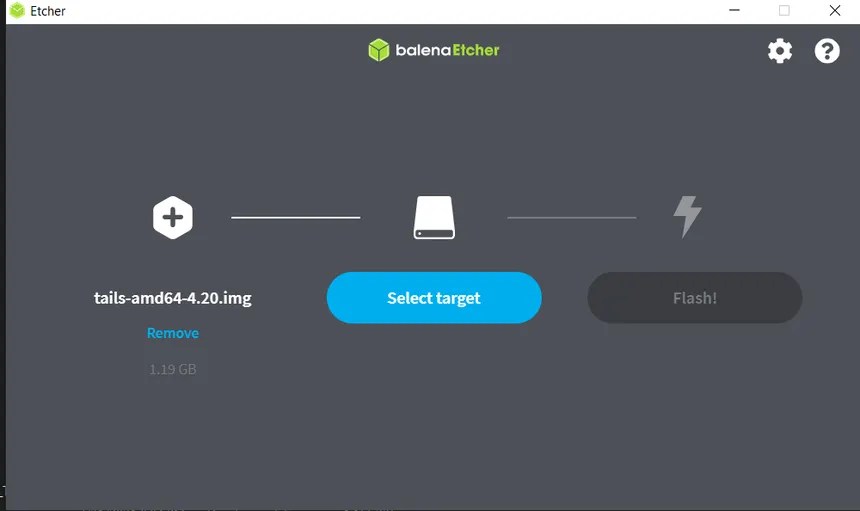
- Open balenaEtcher, select the Tails
.imgfile you downloaded, and select your USB drive. - Click Flash! This will wipe the drive and install the base version of Tails.
Phase 3: The First Boot
- Shut down your computer.
- Plug in your Tails USB and turn the computer back on.
- Immediately tap your “Boot Menu” key (usually
F12,F11,ESC, orDeletedepending on your laptop model). - Select the USB Stick as the boot device.
- When the Tails Greeter appears, select your language and click Start Tails.
Phase 4: Activating “Persistence” (The Working Side)
By default, Tails forgets everything. To use this for work (saving PGP keys, bookmarks, or documents), you must create an encrypted “vault” on the same stick.
- On the Tails desktop, go to: Applications -> Tails -> Configure Persistent Storage.
- Set a strong passphrase. This is the only thing protecting your files if the USB is lost or stolen.
- You will be presented with a list of features to save (Personal Data, Tor Browser Bookmarks, Network Connections, etc.). Toggle on the ones you need.
- Click Save.
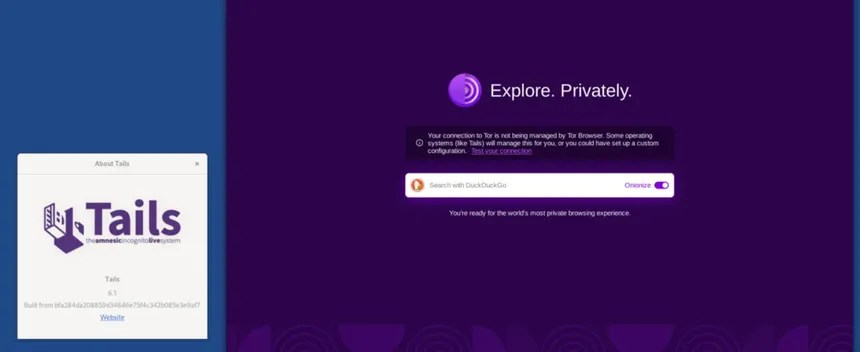
- Restart Tails. Now, in the Greeter (startup screen), you will see an option to “Unlock” your persistent storage. Enter your password, and your “Ghost” now has a memory.
Best Practices for the Invisible Worker
- Never Log into Personal Accounts: If you log into your personal Facebook or Gmail while using Tails, you have effectively “unmasked” yourself to those providers. Use Tails for anonymous browsing or work only.
- The Physical Kill-Switch: If you are in a situation where your privacy is compromised, simply pull the USB stick out. Tails will immediately initiate a “memory wipe” and the computer will shut down, leaving no evidence of your session.
- Stay Updated: Tails will notify you when a new version is available. Always update immediately; in the world of privacy, an unpatched system is a vulnerable one.
Reclaim Your Privacy
The transition to a persistent Tails USB is the moment you stop being a data point for corporations and governments and start being a private individual again. It is the ultimate tool for digital sovereignty.


 V3ndta Cybersecurity
Leave a comment